One platform · five tools

Collect, share and automate client documents

Upload forms, secure PDF links, visual tables and Google Sheets automations. One login, one client list, one set of folders.

No account needed for your clientsFree foreverNo cardGDPR, EU‑hosted
Take a look inside
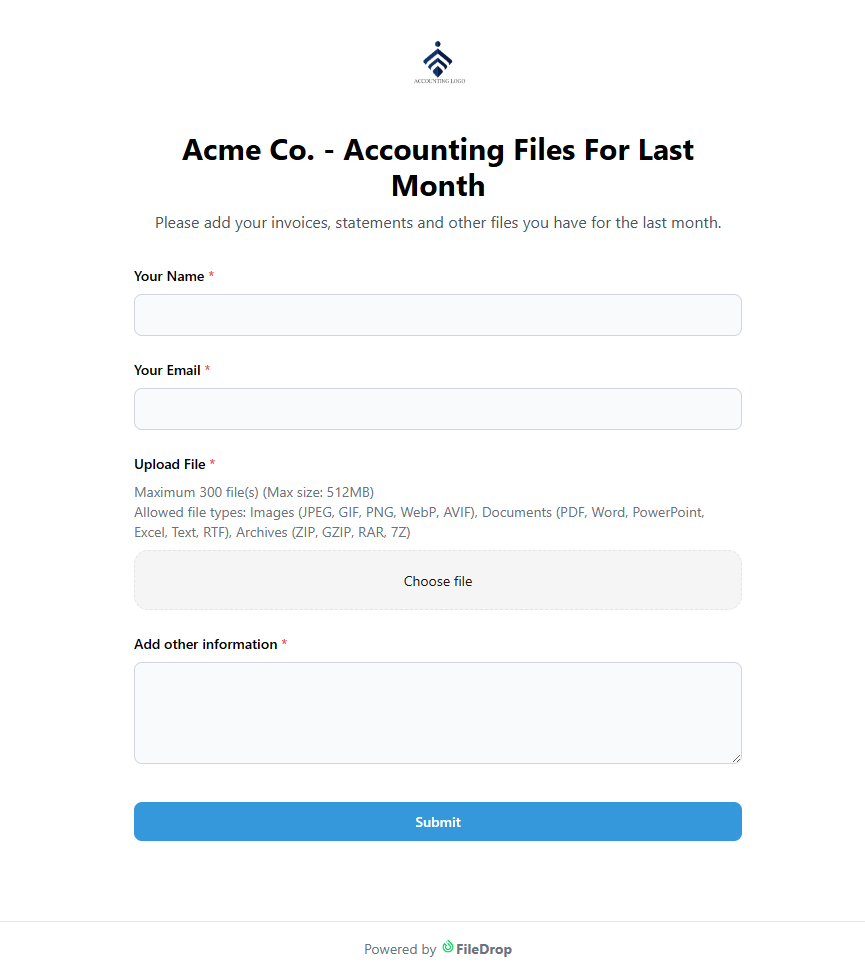
A FileDrop upload form an accounting client fills in, with file upload fields
Reminder sent3 clients chased automatically
Per-viewer view analytics for a PDF shared as a FileDrop link
Email-verified accessOnly invited addresses can open it
A FileDrop visual table of products with image thumbnails
Published as a catalogueOne public page, no login
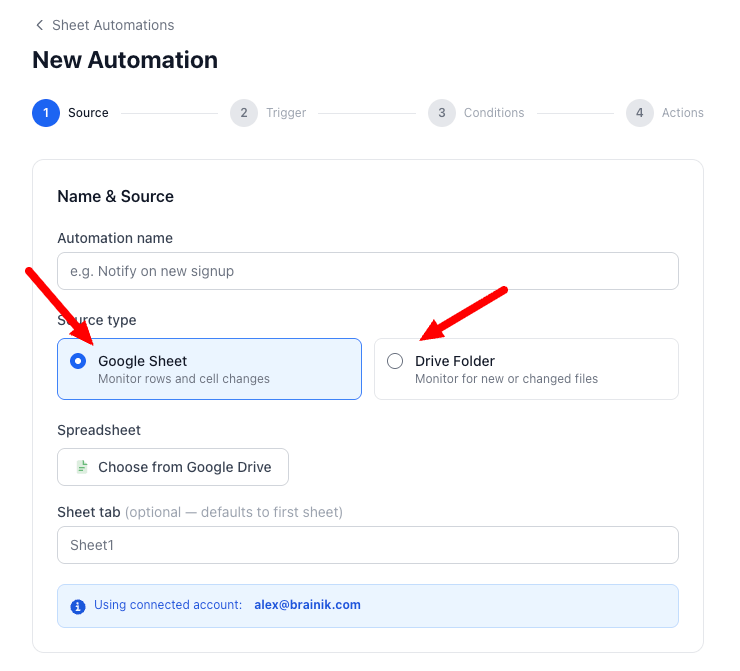
Choosing a trigger source in the FileDrop automation builder
No code involvedBuilt from triggers and actions
The FileDrop add-on sidebar open inside Google Sheets
25 files per uploadStraight into the sheet
Trusted by users at Shopify, Toyota, Stanford University, Paramount, Sotheby's, McDonald's, HBO and Columbia University
★★★★★Google Workspace Marketplace
Made in the EU · hosted in Germany
TLS 1.3 encryption
GDPR, CCPA & CASA
Trusted since 2022
See it work

Watch a file request go out — and come back

A walkthrough of the part that costs your team the most time: asking clients for documents, and getting them without sending a single follow-up email.

FileDrop product tour: requesting and collecting files with upload forms

The video player is only embedded once you press play.

Upload forms & file requests

Ask once. FileDrop does the chasing.

Build a request page in minutes, send it to one client or two hundred, and watch the checklist fill itself in. No logins, no 25 MB email limits, no attachment named final_FINAL_v3.

  • Automatic reminders and follow-ups — FileDrop nudges whoever has not replied, so you do not have to.
  • Bulk request campaigns — send the same checklist to your whole client list in one go.
  • Your logo, your colours, your address — forms live on a custom form address that looks like you, not us.
Explore upload forms
app.getfiledrop.com/forms/new
The FileDrop drag-and-drop form builder
Build the request in minutesDrag the fields you need, then send it to one client or two hundred
PDF sharing & links

Send the proposal. See who actually read it.

Stop emailing 30 MB attachments that get stuck in spam filters. Share one branded link per document, control exactly what viewers can do with it, and get a read receipt that is worth something.

  • Password, expiry and email-verified access — decide who opens it and for how long.
  • Watermarks, blocked download and print — share sensitive work without losing control of it.
  • Swap the file, keep the link — publish v2 without re-sending a single email.
Explore PDF links
share.youragency.com/proposal
An agency proposal shared as a branded FileDrop PDF link
One branded link per documentPassword, watermark and expiry decided before you hit send
Tables

Everything clients sent you, finally in one view

Submissions, images, products and assets in a visual database that shows thumbnails instead of filenames. Publish any table as a public catalogue page when a client asks to see the collection.

  • Image-first rows — built for the things spreadsheets handle badly.
  • Fed straight from your forms — every submission becomes a row, automatically.
  • Public catalogue pages — share a table as a browsable page, on every plan.
Explore tables
app.getfiledrop.com/tables
A FileDrop visual table published as a product catalogue
Thumbnails, not filenamesPublish any table as a public catalogue page
Automations & the Google add-on

The busywork that starts after the file arrives

A file lands, and then someone renames it, files it, updates a spreadsheet and tells the team. FileDrop does that part. Automations run on Sheets and Drive; the Workspace add-on puts files, images and OCR right inside your spreadsheet.

  • Triggers and actions, no code — new row, new file or a schedule, then notify, move, create folders or back up.
  • Scheduled Google Sheets backups — a safety net that runs itself.
  • OCR and batch tools — pull text out of scans and images in bulk, straight into cells.
Explore automations
app.getfiledrop.com/automations
A scheduled Google Sheets backup automation in FileDrop
Triggers and actions, no codeIncluding scheduled Google Sheets backups that run themselves
Integrations

It plugs into where your files already live

Nothing has to move house. FileDrop drops into the storage, spreadsheets and chat tools your team already opens every morning.

  • Store — route uploads straight into Google Drive, Dropbox or OneDrive.
  • Organise — push responses into Google Sheets, Airtable or Excel.
  • Get told — notifications in Slack, Microsoft Teams or Google Chat.
  • Build — automations, plus a developers API and webhooks for the rest.
See all integrations
FileDrop integrations: Google Sheets, Google Drive, Dropbox, Airtable, Excel, Google Chat, Slack, Microsoft Teams, OneDrive, Automations and the developers API
Security & compliance

Client documents deserve better than an email attachment

FileDrop is built and hosted in Europe, on infrastructure you can name, under rules you can point your legal team at.

Encrypted end to end

TLS 1.3 in transit and encryption at rest, on every plan including the free one.

EU data residency

Hosted in Germany by Hetzner. Built in the EU by HeadwayApps since 2022.

GDPR, CCPA, CASA

Privacy compliance documented in the open, plus a Google-verified security assessment.

Access you control

Passwords, email-verified access, link expiry, blocked download and print, watermarks.

What people say

From HR teams, agencies and workshops

★★★★★

“As a people operations associate on an HR team, this extension has been a lifesaver when it comes to having to implement new software systems for my organization.”

JJane H.Human Resources
★★★★★

“This makes it phenomenally easy for my team and I to keep docs and data all in one place.”

GGabrielle FrakeTeam lead
★★★★★

“We manufacture industrial mixers, we are trying to reduce the amount of paperwork laying around in the workshop. It is working great for us.”

KKyrieAdministration
★★★★★

“FileDrop is awesome! I’m using it to upload a lot of storyboard frames in a spreadsheet. This app greatly reduces the time to do that.”

GGustavoVideo editor
★★★★★

“Most beautiful way to drop files in any Google-related docs. And PDF.”

DDanish MithaniGoogle Workspace user
★★★★★

“I had a specific need and it worked perfectly for that.”

DDavid G.Small business
FAQ

Questions we get asked first

Still unsure? Talk to us — chat is open 10:00–19:00 CET.

Do my clients need an account to send me files?

No. Anyone with your link can upload — no sign-up, no Google account, no app to install. They open the page, drop the files, and you get them. That is the whole point.

What do I actually get on the free plan?

All five tools, forever, at smaller volumes: 1 upload form with 25 responses a month, 200 MB of storage, 2 tables, 10 automation runs a week and 50 add-on uploads. No credit card, no trial clock.

Where is my data stored?

In Germany, on Hetzner infrastructure. FileDrop is built and run in the EU by HeadwayApps, and has been since 2022. Encryption is TLS 1.3 in transit, and we publish our GDPR, CCPA and CASA positions in full.

Can I use my own domain and remove your branding?

Yes. FileDrop branding comes off on Pro and above. Links on your own domain, plus team admin and seat assignment, are on Business+ and Max.

Does it work if we do not use Google Workspace?

Yes. Forms, PDF links and tables are a standalone web platform, and you can route uploads to Dropbox or OneDrive instead. The Sheets add-on and the Sheets automations are the parts that need Google.

How do the reminders and follow-ups work?

You set an interval and a maximum number of nudges. FileDrop emails only the people who have not responded yet, and stops the moment their files land. Pro includes 500 requests and reminders a month, Business+ 1,000 and Max 5,000.

Stop chasing documents. Start collecting them.

Set up your first request page in about five minutes. The people sending you files will not need to install, sign up or learn anything.

Free foreverNo credit cardCancel anytime